
Members do not live in the recipe library alone. They save favorites, build lists, finish programs, pick up where they left off, and--when you allow it--create their own meal plans and recipes. My Stuff is the signed-in home for all of that: one page at /my-stuff instead of a dozen bookmarks.
What My Stuff is (and why members need one home)
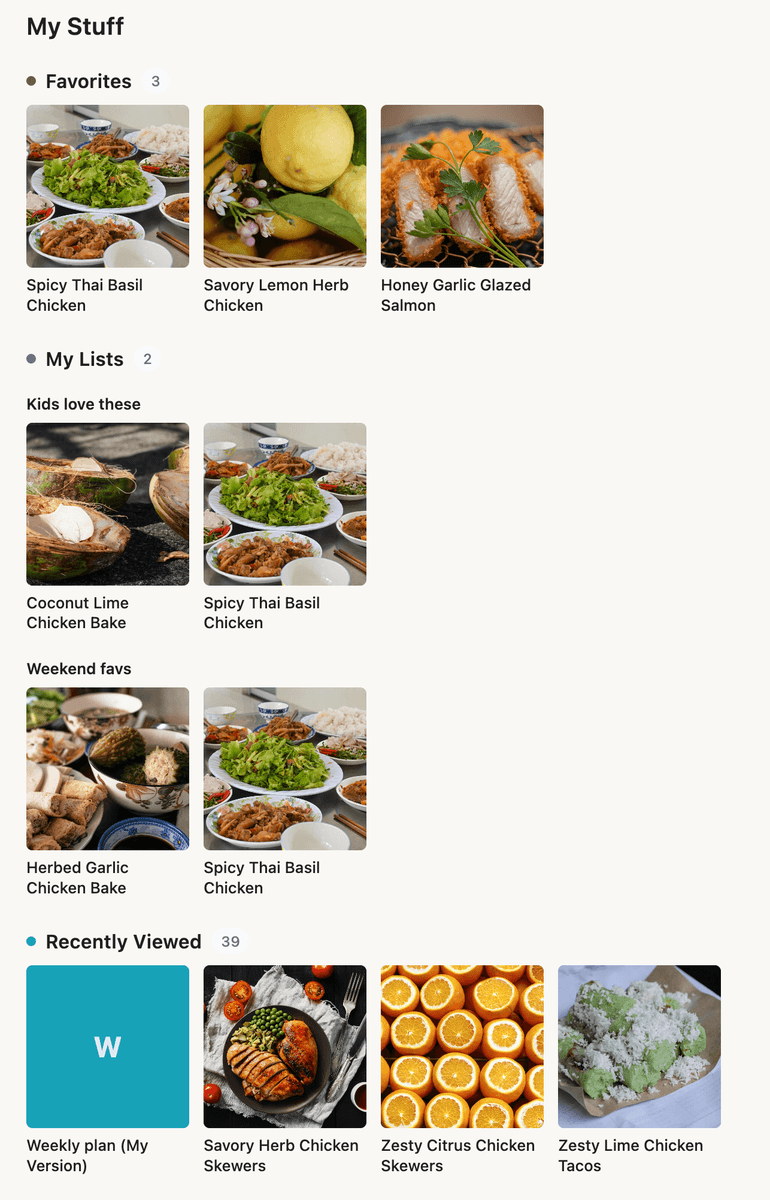
Think of My Stuff as each member’s personal layer on top of your catalog. The library is what you publish; My Stuff is what they curate and track:
Content they hearted (Favorites)
Custom collections (My Lists)
What they finished (Completed)
Where they left off browsing (Recently Viewed)
Active programs (My Journeys, when journeys are enabled and they are enrolled)
Their own creations (My Meal Plans, My Recipes, My Bites when those permissions are on)
Pantry staples for shopping lists (My Pantry, when pantry is enabled)
When a member returns to your app, My Stuff answers “What was I working on?” without forcing them to search the full site again.
How the page is organized
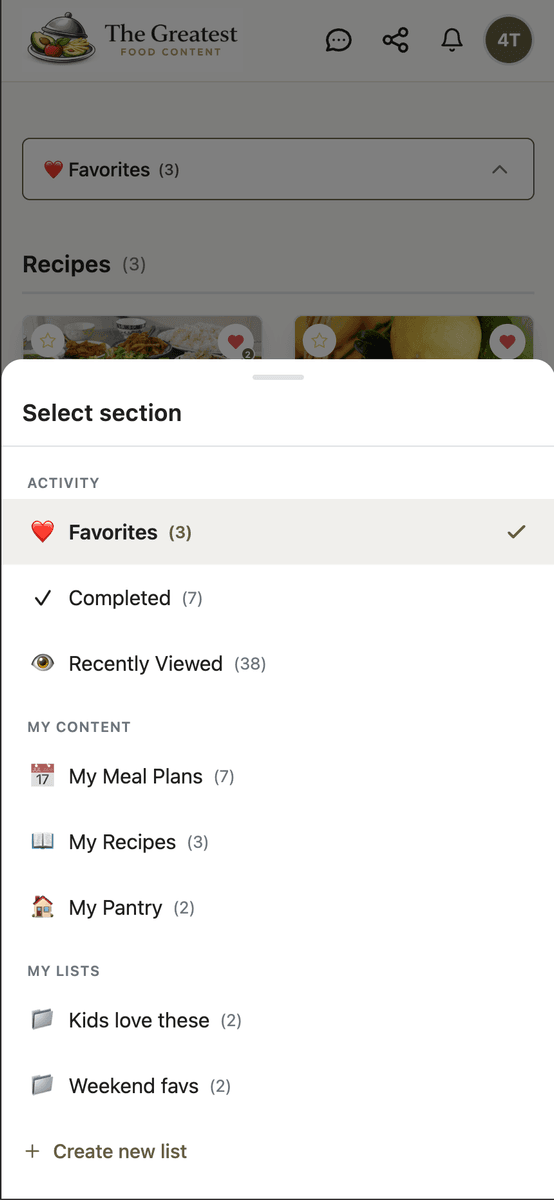
On desktop, navigation groups sections so the page stays scannable. On mobile, members use Select section to jump between areas.
Activity -- engagement with your content:
Favorites -- saved items, grouped by content type (recipes, meal plans, resources, and more depending on your favorites settings).
Completed -- content they marked complete, with completion context where you use completions.
Recently Viewed -- a short history of what they opened recently (helpful for “that recipe I saw yesterday”).
My Journeys -- enrolled journeys with progress; appears when they have active enrollments.
My Content -- things they created or manage (sections only show when the feature and their access level allow it):
My Meal Plans -- private member-created plans.
My Recipes -- member-authored recipes.
My Bites -- lightweight snacks and add-ons (label follows your Bite labels in App Settings).
My Pantry -- ingredients they keep on hand for smarter shopping lists.
My Lists -- named lists they create. Each list is its own section in the nav; opening a list shows only items in that list. Members can create, rename, or delete lists from here; removing something from a list does not delete the underlying content from your platform.
Sections with nothing to show stay out of the way--members are not greeted by empty tabs for features they do not use.
What admins turn on
My Stuff is only as rich as the features you enable:
App Station → Features → Favorites -- turn favorites on globally and choose which content types can be favorited.
App Station → Features → Lists -- enable custom lists; without this, the My Lists area does not appear.
Member-created content -- meal plans, recipes, and bites require the member-created content feature and the right toggles on each Access Level under Monetization → Access Levels (for example permissions to create meal plans or recipes).
Journeys, completions, pantry -- when those modules are on for the tenant, the matching My Stuff sections appear for members who have data in them.
You do not configure My Stuff as a single monolithic switch--it reflects how you have already set up engagement and member permissions.
How it looks: card size and card layouts
Under App Station → Pages & Menu → List Pages, scroll to System Pages and open settings for My Stuff. The main control today is Card size--the same density scale you know from Content Grid blocks:
Compact / Small -- more cards per row; good for large libraries of favorites.
Medium -- default balance.
Large / Feature -- fewer, bigger cards for visual brands.
Card size controls grid density on My Stuff. It does not change which fields appear on each card--that still comes from each content type’s default Card Layout on the Card Layouts tab. Tune layouts there (image, title, meta chips); tune density here.
My Bites uses a compact tile layout on My Stuff; card size only adjusts how many bite tiles fit per row.
Branding and discovery
Rename the hub -- App Station → App Settings → Labels includes a My Stuff label field. Use it when your brand prefers “My Kitchen,” “Saved,” or a translated name. The label updates navigation, breadcrumbs, headings, and related links. Leave it blank to use the default translated “My Stuff.”
Surface it on the home page -- add a My Stuff Hub block in the Page Builder on your home (or dashboard) page. The hub shows mini previews of favorites, lists, journeys, recently viewed items, completed content, and member-created items--with links into the matching /my-stuff sections (for example ?section=recently-viewed). Choose Rails (horizontal rows) or Stack (polaroid-style stacks) in the block config. The hub is a doorway; the full page remains the place to manage everything.
Access and trust
My Stuff respects the same access rules as the rest of the app. If a member loses an access level, items they can no longer open fall out of favorites and lists over time--they do not keep seeing locked premium content in their personal hub.
Removing a favorite or deleting a list only affects that personal organization. Your published recipes and plans stay in the catalog for other members.
When members open content from My Stuff, breadcrumbs can preserve My Stuff context so back navigation returns them to the list or section they came from--not a dead end in the library.
Launch checklist
Enable Favorites and Lists if you want the core personal sections.
Set My Stuff card size under System Pages to match how dense your card grids feel elsewhere.
Confirm default Card Layouts for recipes and meal plans look good in a personal grid.
Optionally rename the page under Labels and add My Stuff Hub to the home page.
As a test member: favorite two recipes, create a list, view a third recipe, then open My Stuff and confirm Favorites, Recently Viewed, and My Lists tell a coherent story.
My Stuff turns a content app into their app--without a separate product or a custom build for every creator.
Favorites and lists matter most when you have a deliberate path from free account to paid access--not only more public recipes.