
You publish a five-day meal plan. Tuesday’s dinner is chicken tacos--and a member writes in: “Love the plan, need a vegetarian slot.” You do not want to fork the whole plan or leave them searching your entire library. You want curated alternates for that one recipe.
Swap options are how you offer those alternates: full recipe variations you define once, surfaced when members customize a meal plan.
 Your situation
You already author real recipe variations--black bean tacos instead of chicken, a dairy-free sauce, a lighter pasta bake. Each variation is its own recipe with its own ingredients, steps, and nutrition. What you need is a controlled way to say, “If this recipe is in the plan, members may switch to these recipes”--not every recipe in the catalog.
Swap options attach to the base recipe in the meal plan slot. The plan still lists your default; members choose an alternate at view time.
What you do in App Station
Create the variations -- Duplicate and edit, or import separate recipes. Give titles members will recognize (“Tacos -- Black Bean,” “Tacos -- Chicken”).
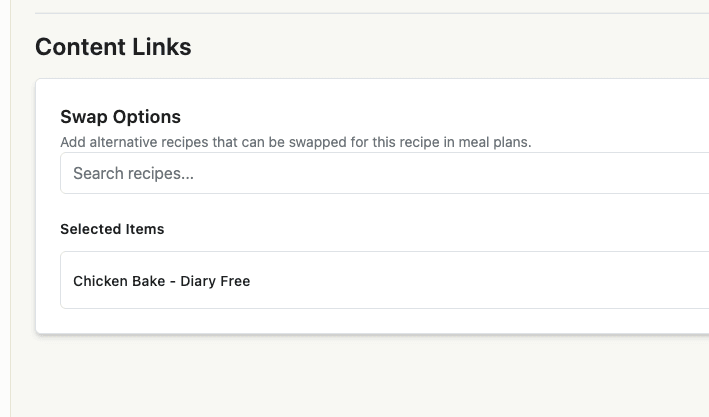
Link swaps on the default recipe -- Open the recipe members will see in the plan → Extras tab → Swap Options. Search and add each alternate (“Add alternative recipes that can be swapped for this recipe in meal plans”). Save the recipe before adding swaps if it is new.
Build the meal plan with the default -- Place the base recipe in the plan (not every variation). Swaps travel with that recipe wherever it appears--in a standalone plan or a weekly schedule week.
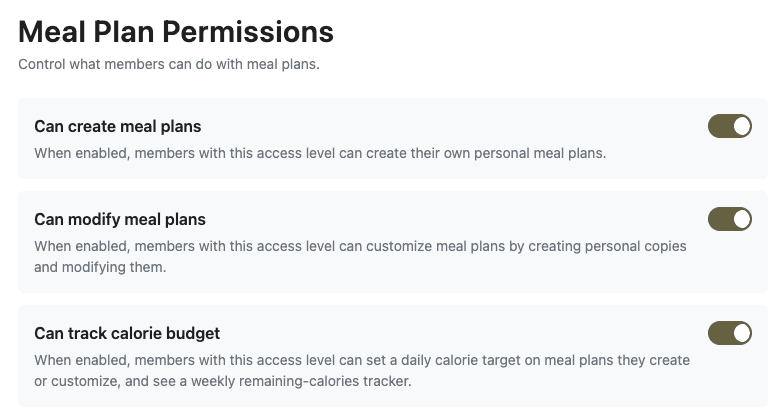
Allow members to modify plans -- On the member’s access level, enable Can modify meal plans. The tenant also needs the member content modifications capability so swap controls appear on meal plan views.
What members experience
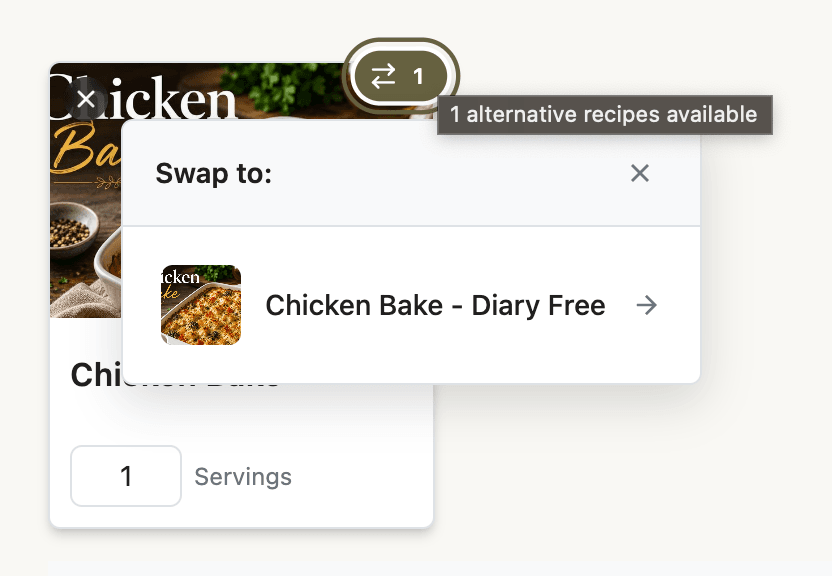
On the meal plan grid or detail view, recipes with swap options show a swap indicator (a count of available alternates, or a “swapped” state if they already changed the slot).
Tap the indicator → a popover lists your predefined swap options with thumbnails and titles.
Pick an alternate → the slot updates to that recipe. If they already swapped, they can revert to the original recipe from the same menu.
The first customization may create a personal copy of the admin plan so their changes do not affect other members. Shopping lists and nutrition follow the swapped recipe on their copy.
Guests who try to swap are prompted to sign in first.
Admins previewing a plan see the same UI in read-only form--useful when QA-ing swap options before publish.
Tips that save time
Name for the swap moment -- Titles should read clearly in a small popover (“Salmon Bowl” vs “Salmon Bowl -- Tofu”).
Link both ways when needed -- If either recipe could appear as the default in different plans, add swap options on each so members are never stuck.
Not component recipes -- Component recipes embed a sub-recipe inside one recipe. Swaps replace the whole recipe in a meal plan slot.
Not ingredient swaps -- Ingredient-level substitutions inside a single recipe are a different member feature. Swap options are whole-recipe alternates you curate as the admin.
Test one day -- Publish a short plan with one swappable dinner, swap as a test member, and confirm the shopping list reflects the alternate.
If you sell tiers, pair swap-friendly plans with access levels that allow modification on Premium only--free preview tiers can stay read-only. That keeps customization a clear upgrade benefit without rebuilding content.